[FileName]
[FileType] [FileSize]
", //...other params... } }) ``` ### Property Value Type: **String** HTML-like template of the data, which is displayed inside the tile in the upload pane. Default value is **"<p>[FileName]</p><p style="color: #555555">[FileType] [FileSize]</p>"**. ## Remarks A tile template is a string, which can include simple text, HTML tags, and predefined variables. Within a template you can use the following: - tags: `` and ``
- attributes: `style`, `rows` (for ` ` tag only), `width` (for `` tag only; in percents or in pixels), and `align` (for `` tag only; can be `left`, `right`, and `center`)
- styles: `color`, `font-size` (percent value, pixels like `12px`, or points like `10pt`), `font-style` (`italic` or `normal`), and `font-weight` (`bold` or `normal`)
The following predefined variables are available in templates:
| Variable name | Returned value |
| --- | --- |
| **`FileName`** | file name |
| **`FileSize`** | file size |
| **`FileType`** | file type |
| **`DateModified`** | file last modification date |
| **`Dimensions`** | image size in pixels; an empty string for non-image files |
| **`Description`** | user-given description of the file |
| **`Tag`** | tag of the file; the tag can be specified via the [tag](https://www.aurigma.com/docs/us8/JA_P_J_$au_file_tag.htm.md) property |
To utilize a predefined variable in a template, you should put variable's name in square brackets.
**Note**
White spaces are not allowed between the '<' and the tag name, between '</' and the tag name, or inside '/>'.
The sample below demonstrates how to use tags, style, and predefined variables described previously; you can see the resulting tiles in the following figure:
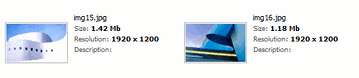 ```
var u = $au.uploader({
id: 'Uploader1',
folderPane: {viewMode: 'Tiles', tileHeight: '100', tileWidth: '250', tilePreviewSize: '100',
tileTemplate: ' [fileName] Size: ' +
'[FileSize] Resolution: ' +
'[Dimensions] Description: ' +
'[Description]