FolderPane.TileTemplate Property


Gets or sets an HTML-like template of the data displayed inside a tile.
Namespace:
Aurigma.ImageUploader
Assembly:
Aurigma.ImageUploader (in Aurigma.ImageUploader.dll)
Syntax
Public Property TileTemplate As String
public string TileTemplate { get; set; }
Property Value
Type: System.String
HTML-like template of the data, which is displayed inside the tile in the folder pane.Default value is "<p>[FileName]</p><p style="color: #555555">[FileType] [FileSize]</p>".
Remarks
A tile template is a string, which can include simple text, HTML tags, and predefined variables. Within a template you can use the following:
- tags:
<p>and<span> - attributes:
style,rows(for<p>tag only),width(for<span>tag only; in percents or in pixels), andalign(for<span>tag only; can beleft,right, andcenter) - styles:
color,font-size(percent value, pixels like12px, or points like10pt),font-style(italicornormal), andfont-weight(boldornormal)
The following predefined variables are available in templates:
| Variable name | Returned value |
|---|---|
FileName | file name |
FileSize | file size |
FileType | file type |
DateModified | file last modification date |
Dimensions | image size in pixels; an empty string for non-image files |
Description | user-given description of the file |
Tag | tag of the file; the tag can be specified via the tag property |
To utilize a predefined variable in a template, you should put variable's name in square brackets.
White spaces are not allowed between the '<' and the tag name, between '</' and the tag name, or inside '/>'.
The sample below demonstrates how to use tags, style, and predefined variables described previously; you can see the resulting tiles in the following figure:
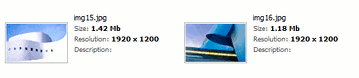
<aur:Uploader ID="Uploader1" runat="server">
    <FolderPane ViewMode="Tiles" TileHeight="100" TileWidth="250" TilePreviewSize="100"
        TileTemplate="<p>[fileName]</p><p style='font-size: 85%; color: #555555' >Size:
        <span style='font-weight: bold; color: #000000'>[FileSize]</span></p>
        <p style='font-size: 85%; color: #555555' >Resolution:
        <span style='font-weight: bold; color: #000000'>[Dimensions]</span></p>
        <p rows='3' style='font-size: 85%; color: #555555'>Description:
        <span style='font-weight: bold; color: #000000'>[Description]</span></p>" />
</aur:Uploader>
See Also
Reference
- FolderPane Class
- Aurigma.ImageUploader Namespace
- $au.folderPane.tileTemplate JavaScript Property
- FolderPane.TileTemplate PHP Property